


Carly — OBD2 car scanner
3.71.38K Reviews
App Specs
- Version
- 49.98
- Updated On
- License
- Free
- Downloads
- 1,000,000+
- Developer
- Carly Solutions GmbH & Co KG
- Categories
- Auto & Vehicles
- Platform
- Android, iOS
Screenshots


 Analysis by AppCompare
I share a car with other people in my household, so I judge a diagnostic app by more than how quickly it finds a fault. It also has to fit into a sensible routine: one person can check a warning, explain what they found, and hand the car back without turning a basic scan into a confusing project. Carly — OBD2 car scanner is aimed at that practical kind of ownership, though its coding tools make it more ambitious than a simple warning-light reader.
When one car has several drivers
Picture a familiar situation: someone borrows the car for errands, a dashboard warning appears, and the usual driver wants to know whether it needs attention right away. A scan can give the household a useful starting point before anyone books a workshop visit. I would use the result to describe the warning clearly and decide on a next step, not to ask every driver to interpret technical information independently.
That distinction matters with shared vehicles. The app can help a family or a pair of housemates communicate about the car, but it should not become a substitute for agreeing who is responsible for maintenance or who is allowed to change vehicle settings. Before connecting, I’d make sure the person scanning knows which car is being checked and that the usual driver is aware. A little coordination prevents the awkward situation of one person seeing a warning and another assuming it has already been dealt with.
Setup is a boundary, not just a download
Carly is a phone app that works with an OBD2 Bluetooth adapter plugged into the car’s diagnostic port. That means getting started involves more than installing software: you need a compatible adapter and a suitable vehicle connection. I would check that the particular car and the functions you care about are supported before buying hardware or paying to unlock anything. Compatibility can vary by vehicle, and a feature that is available for one model may not be available for another.
For a shared car, I’d also decide whose phone will be used for routine checks and who will handle any coding. Keeping the scan-and-review job with one confident driver makes it easier to compare findings over time and reduces the chance that someone changes a setting without the owner’s knowledge. That is a household habit rather than a special family-control feature, so it depends on clear agreement among the people using the vehicle.
Who should interpret a scan?
The app is in the Auto & Vehicles category, and its developer is Carly Solutions GmbH & Co KG. It is free to install, with in-app purchases ranging from $2.74 to $118.99 per item. I’d treat that as a reason to check what a particular purchase unlocks for your vehicle before committing, rather than assuming every function is included at no cost.
Its Everyone age rating is about the app’s store classification, not a recommendation that children should diagnose or modify a family car. I’d keep responsibility for interpreting codes, deciding whether a warning is urgent, and changing settings with the adult owner or an experienced driver. The app can make vehicle information easier to access, but a scan still needs context: symptoms, driving conditions, and professional judgment can all matter.
Worth Reading Before You Choose

EA SPORTS FC Mobile 26 Is a Bigger Football Game, but It Takes Time

Flipboard Shows What News Apps Must Do Beyond the Feed

Switching to Android Auto Means Rethinking Your Driving Routine

Google Calendar Makes a Crowded Week Easier to Manage

Ludo King Makes the Most of the Minutes Between Plans

Baby Panda World Brings Quick Play to Modern Phones, but Its Game Library Feels Busy
Making a scan useful to the whole household
A practical routine is to note the warning, run a scan while the car is parked, and share the result with the person who normally arranges repairs. Avoid experimenting with coding when someone needs the car shortly afterward; even a change that sounds minor deserves a calm moment to understand its purpose and consequences. If the car behaves unusually or a warning suggests an urgent problem, don’t let an app reading delay getting qualified help.
This is where Carly can be more useful than a one-off scan at a parts counter: the owner can check the car at home and bring clearer information into a repair conversation. The trade-off is that an app does not physically inspect the vehicle. A fault code can point toward an area to investigate without proving which component has failed, so I wouldn’t treat a code as a complete repair diagnosis or buy parts solely on that basis.
For households with several drivers, the best outcome is shared understanding, not shared guesswork. One person can run the check, another can help arrange a garage appointment, and everyone can agree not to clear or alter anything just to make a warning disappear. That approach preserves the value of the information and keeps the app in its proper role: a helpful first look rather than the final authority.
Getting Started with Carly
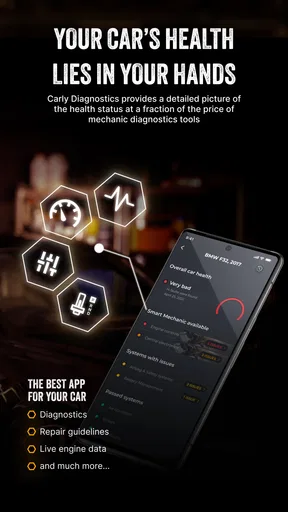
First things first, downloading and setting up Carly is a breeze. Available for both Android and iOS, this app connects to your car’s OBD2 port with a Bluetooth adapter. If you’re worried about compatibility, fear not! Carly covers a wide range of cars, and they keep updating the list. Once you’re connected, you’re ready to explore the depths of your vehicle’s heart.
Simplifying Car Diagnostics
The beauty of Carly lies in its simplicity. You don’t need to be a tech whiz to navigate through the app. The interface is intuitive, with clear tabs and options that guide you through the process. Whether it’s a basic health check or a deep dive into specific issues, Carly’s got your back.
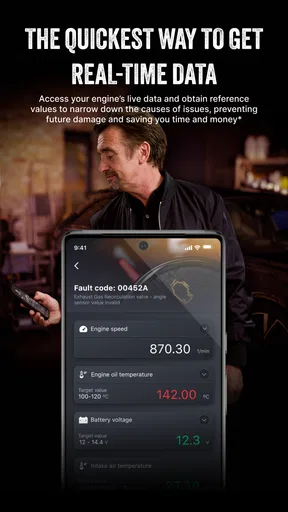
The real-time data feature is a gem. You can monitor your car’s performance live, which is perfect for spotting issues before they become costly repairs. It’s like having a mechanic in your pocket.
Customization and Coding
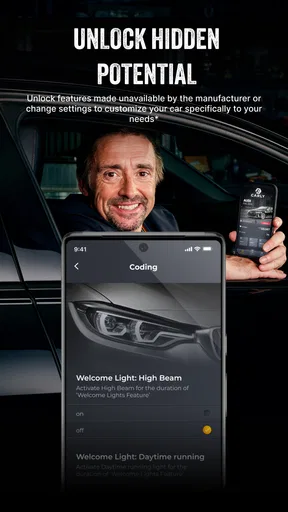
One of my favorite features is the coding option. Carly allows you to code your car, unlocking features you didn’t even know you needed. Want to tweak your car’s lighting or enable a hidden feature? Carly makes it possible with just a few taps.
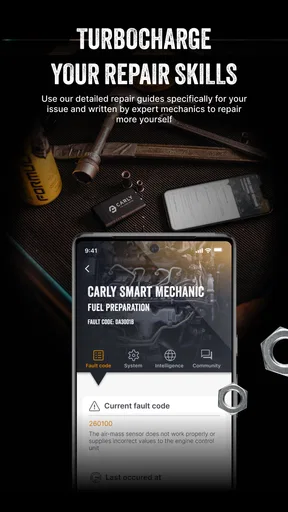
However, a word of caution: coding isn’t for the faint-hearted. Make sure to read up and understand what each change entails. Thankfully, Carly provides detailed instructions and safety checks to ensure you don’t turn your car into a disco ball.
Cost and Value
Now, let’s talk about the moolah. Carly offers a free version with basic diagnostics, but to unlock its full potential, you’ll need to subscribe. Is it worth it? In my opinion, absolutely. The subscription costs are far less than a single trip to the mechanic for diagnostics. Plus, the peace of mind knowing what’s going on under the hood is priceless.
For those who love a good deal, Carly often runs promotions, so keep an eye out for discounts. Investing in Carly is like investing in the longevity of your car.
User Experience and Support
From a user experience standpoint, Carly excels. The app is regularly updated, ensuring it’s always in peak condition. The customer support is responsive and genuinely helpful, which is a rarity these days.
If you ever run into issues, the Carly community is vibrant and active. There’s a plethora of resources, forums, and FAQs to help you out. It’s reassuring to know you’re not alone in this car diagnosis journey.
What to expect from the numbers
Carly has an average rating of 3.6 from around 31,000 ratings, with roughly 1,400 written reviews and over a million installs. I read that as evidence of a widely used tool with mixed experiences, not as a guarantee that it will work equally well with every car. The app’s current version is 49.74, and it supports Android 8.0 and later. Those details are useful when deciding whether an older phone can stay in the glovebox as a dedicated scan device.
Compared with a basic generic OBD2 reader, Carly puts diagnostics and vehicle customization in one phone-based workflow. A simple reader may be the better choice if all you want is a low-friction way to view and clear basic codes, especially if you already own compatible hardware. Carly makes more sense when you value a guided interface and are curious about vehicle-specific functions. Neither option replaces a mechanic’s inspection, and the wider feature set is only an advantage if your car supports the functions you actually plan to use.
A sensible way to use the live information
Real-time readings are most useful when you have a specific question, rather than when you watch numbers without a baseline. I’d first note what the car is doing—such as a warning appearing during a particular kind of drive—then look at relevant information while safely parked or with a passenger handling the phone. Don’t handle the app while driving. A short, focused check is easier to interpret than trying to monitor everything at once.
It is also worth separating a temporary observation from a confirmed fault. If a reading looks unusual, repeat the check under similar conditions and consider whether the symptom is still present. If the car is running roughly, losing power, or showing a serious warning, get professional advice instead of trying to troubleshoot through repeated scans. Carly can make a conversation with a repair shop more informed; it cannot confirm every mechanical cause from a screen.
When coding is the wrong experiment
The coding tools are the feature I’d approach most carefully. Before changing anything, I’d identify the exact setting, confirm that it applies to the vehicle, and make sure the car is parked with enough time to deal calmly with an unexpected result. I would avoid testing a change just before a long trip or while another household member is waiting to use the car. If the owner is not comfortable with the effect or cannot explain why the change is wanted, leaving the setting alone is the sensible choice.
This is also where Carly differs from a diagnostic-only alternative: customization can be appealing to an enthusiast, but it adds responsibility that a simple code reader does not invite. Someone who only needs to understand a warning light may never need coding. For that person, the extra capability may feel like clutter, and a basic scanner or a direct visit to a repair professional may be a better fit.
What I would check before paying
Because access to more features involves in-app purchases, I’d start with the free experience and a clear list of needs. Check that the vehicle is supported for the specific diagnostic or coding job, confirm that the required adapter is available, and look at the purchase details before paying. The key question is not whether the app has many functions; it is whether the functions you want apply to your car and are worth the cost for how often you’ll use them.
That makes Carly easier to recommend to people who maintain their own cars, like understanding warnings before speaking with a garage, or enjoy carefully personalizing supported settings. I’d be more cautious about recommending it to someone expecting a universal, one-tap fix, someone without a compatible adapter, or a driver who would rather have a mechanic interpret every result. If scans are rare and the car is already serviced reliably, a paid feature may not offer much practical value.
Final Thoughts
In a nutshell, Carly — OBD2 car scanner is a must-have for anyone who wants to take control of their car’s health. Whether you’re a car enthusiast or just someone who wants to avoid unexpected repair bills, Carly is your ally. It’s easy to use, packed with features, and offers great value for money. So, give it a whirl and turn your smartphone into the ultimate car companion. Happy driving!
My more measured recommendation is to see it as a useful companion for informed ownership, not a replacement for a workshop or a promise of savings. Its strongest case is a driver who will scan thoughtfully, check compatibility, and use the results to ask better questions. In a shared household, clear agreement about who scans and who changes settings makes it more helpful still. If that describes your situation, Carly is worth exploring; if you only want a quick, occasional code lookup, a simpler option may suit you better.
Pros
- User-friendly interface for easy navigation.
- Provides detailed car diagnostics reports.
- Compatible with most car models.
- Offers real-time vehicle data tracking.
- Regular updates with new features.
Cons
- Requires a subscription for full features.
- Initial setup can be a bit complex.
- Limited free features available.
- Connectivity issues with older cars.
- Customer support response time varies.
FAQs for Carly — OBD2 car scanner
What is Carly — OBD2 car scanner and how does it work?
Carly is a comprehensive OBD2 car scanner app designed for both Android and iOS devices. It connects to your car's OBD2 port via a Bluetooth adapter, allowing you to perform diagnostics, read and clear error codes, and access various car systems. This app helps users maintain their vehicles by providing detailed insights and reports.
Is Carly compatible with all car models?
Carly supports a wide range of car brands and models, but compatibility may vary for specific features. It's best to check the app's website or within the app to see a detailed list of supported vehicles and features for your specific car model. Regular updates often expand compatibility, so keep your app updated.
What features does Carly offer beyond basic diagnostics?
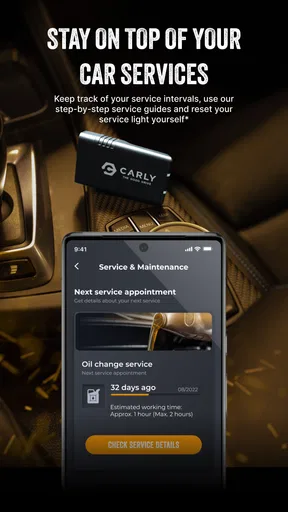
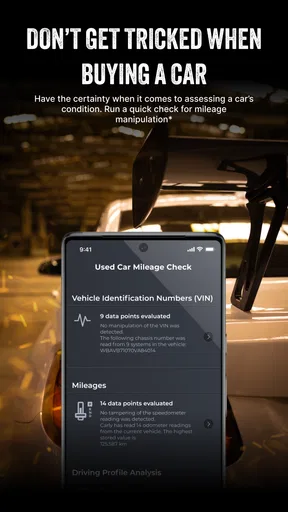
Beyond basic diagnostics, Carly offers features like coding options to customize your car’s settings, battery management, and used car checks to identify potential issues before purchasing a vehicle. It can also provide real-time data on various engine parameters and assist with service resets, making it a powerful tool for car enthusiasts and mechanics alike.
Is there a cost associated with using Carly?
Carly operates on a freemium model. While the app itself is free to download, access to its full range of features requires a subscription. Pricing varies based on the subscription plan and region. Additionally, you’ll need to purchase a Carly OBD2 adapter, available through their website or authorized retailers.
How secure is the Carly app when accessing my car's data?
Carly prioritizes user privacy and data security. The app uses encryption to protect data transmitted between the app and your vehicle. Additionally, it does not store personal vehicle data on external servers, ensuring that your information remains private. Always keep your app updated to the latest version for optimal security features.


